
Invocable actions
ContextWorks ships eight runtime actions and seven administration actions. Register them as Agentforce agent actions or MCP tools, or call them from Flow. All sit in the ContextWorks category and return the same response shape.
How it works
The runtime actions form a discovery sequence:
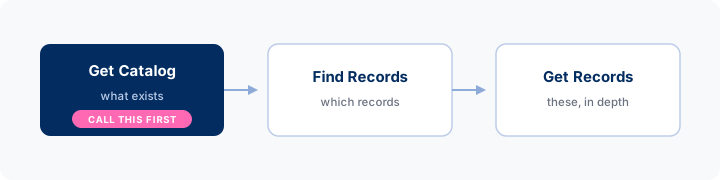
An agent that calls Get Catalog first learns your real object and field names instead of guessing them.
| Action | What it returns | domainApiName |
|---|---|---|
| Get Catalog | What exists: the index, or one entity’s full contract | Optional |
| Find Records | A filtered or aggregated set, with totals | Required |
| Get Records | One or more records in depth | Required |
| Get Briefs | The standing frame the data should be read in | Optional |
| Get Skill | One packaged procedure | Not taken |
| Get Info | One computed fact about the situation | Required |
| Update Records | A diff to approve, then the committed change | Required |
| Create Records | A proposed record to approve, then the new record | Required |
Update Records and Create Records are independent. An org may register one without the other, and the org switch, the domain and the entity each have to allow the operation. Registering an action does not by itself let it act.
Keep the administration actions on their own topic and their own MCP server, apart from the runtime ones. The extension package ships two topics for that. → Administration actions
Get Catalog
Discovery in two depths. With no inputs it returns a version-stamped index. Pass entity names for each one’s full contract.
| Input | Type | Notes |
|---|---|---|
domainApiName | String | Optional. Only the entities this domain carries, which is the live coverage of a scoped tool |
objectApiName | String | Optional. Only the entity for this object |
entityApiNames | String | Optional. Comma-separated names from the index. Returns each entity’s full contract, up to 5 per call |
knownVersion | String | Optional. The stamp from a previous call. An unchanged catalog answers with one line instead of repeating itself |
format | String | markdown (default) · json |
| Depth | What comes back |
|---|---|
Index, with no entityApiNames | One section per domain the caller holds, carrying that domain’s purpose, synonyms and instruction, then a table of the entities it serves. Separate sections list the briefs, Info and skills available |
Contract, with entityApiNames | Per entity: every field with the smallest level that includes it, filterable fields with their live picklist values and sampled example values, writable and creatable fields, required fields, synonyms, and instructions |
| Note | |
|---|---|
| Grouping | Domain sections are what make a domain selectable. An entity in several domains appears in each section, and the API name is its identity |
| Entity instructions | Absent from the index, because they can be long and they explain data the agent has not chosen yet. They arrive with the contract, and with every payload |
| Briefs | A brief delivered In catalog has its body printed here in full rather than as one line, so an agent needs no second call for it. → Delivery |
| Field table | The contract’s fields arrive as a markdown table, with one legend line above it: Lvl L/S/D (— = filter-only) · F filterable · W writable · C settable when creating · R required to create |
| Picklist values | The complete valid set for filters and writes, as API values rather than labels |
| JSON | The same grouping, readable both ways: entities stays a flat array where each entity lists the domains serving it, and domains[] gives each domain {apiName, label, description, instruction, synonyms, isDefault, entities[]}. Each entity contract lists its domains too, which markdown prints as Available through: |
Every action first resolves what the calling user may discover, and ContextWorks refuses a domain they do not hold. Get Catalog, Get Briefs and Get Skill serve whichever domains the caller holds when the call names none. Every record call, and Get Info, names one. No agent receives an inactive entity. → Domain access
Find Records
Returns a filtered set in the entity’s curated list columns, with totals over the full matching set. A query capped at 10 rows still reports the true count and sums. The same action also aggregates (groups instead of rows) and scopes (whose records).
| Input | Type | Notes |
|---|---|---|
objectApiName | String | The object to query. Required unless entityApiName is given, which names its own object |
entityApiName | String | Optional named entity. Its curated columns are returned. Narrows within domainApiName, which must serve it |
filters | String | JSON filter list, on the entity’s filterable fields only. → Filters |
filterNames | String | Comma-separated named filters from the catalog (open,committed). They combine by AND, with each other and with filters. → Named filters |
scope | String | Whose records: all (the default, every record visible to the caller), me, user:<id|name>, team:<id|name> (that user plus direct reports), rollup:<id|name> (their full subtree). A name or part of one works: exact match first, then contains. ContextWorks refuses an ambiguous match and lists the candidates with their ids, so it never picks a person for the caller. me works as the id (rollup:me). These are plain hierarchy walks, with no forecasting awareness, and sharing still applies |
level | String | list (default) · standard. How much of each row. ContextWorks refuses detailed by name: a find is one query, and detailed assembles related lists and enrichment per record |
sortBy | String | Field to sort by, ascending unless followed by a direction: Amount DESC. Filterable fields only. Default: last modified, newest first |
maxRows | Integer | Default and cap are org settings (shipped: 20/50). A capped response says so in the payload |
groupBy | String | One groupable field (the catalog lists them per entity). Returns one aggregate row per distinct value instead of records |
aggregate | String | count, or sum(F) · avg(F) · min(F) · max(F) over an aggregatable field. With groupBy, one value per group, largest first; alone, one summary. When set, level does not apply |
maxGroups | Integer | Groups returned, largest first by the measure. Org-capped (shipped default 10). A truncated response says so and still totals the full set |
sampleSize | Integer | Optional records per group: the 3 biggest deals in each stage. Hard-capped at 10. Requires groupBy |
sampleLevel | String | list (default) · standard. Depth of the sample rows under a group. For ungrouped rows use level |
maxSampledGroups | Integer | How many of the top groups get samples (org-capped, shipped default 5). The rest come back as counts and aggregates only, and the response says so |
format | String | markdown (default) · json · both. → Structure and prose in one call |
domainApiName | String | Required. The domain this call reads through. Requires objectApiName unless entityApiName names one |
Example filter:
[{"fieldName":"IsClosed","operator":"=","values":["false"]},
 {"fieldName":"CloseDate","operator":"<=","values":["THIS_QUARTER"]}]
One call answers “what is my pipeline this quarter by stage, with the biggest deals in each”:
filterNames: open,this_period   scope: me
groupBy: StageName              aggregate: sum(Amount)
sampleSize: 3 maxSampledGroups: 8| Behavior | Detail |
|---|---|
| Sorting | sortBy is ascending unless you add a direction, so “the ten biggest deals” is Amount DESC with maxRows: 10. The field must be filterable on the entity, and each entity’s contract lists those fields. ContextWorks refuses anything after the field other than ASC or DESC, and names the grammar |
| Truncation | Group caps, sample caps and row caps each state what they cut, and totals always cover the full matching set |
| Currency | In multi-currency orgs the platform aggregates in corporate currency, and measures convert to the caller’s display currency |
| Ownership and sharing | scope narrows to whose records. Sharing still narrows to what the caller may see. A question about someone whose records the caller can’t access returns nothing, in totals as in rows |
Get Records
One or more records in depth. Pass comma-separated IDs and each comes back in full, so a set found through Find Records can be read without a call per record. The first column of a Find Records result is the record ID.
| Input | Type | Notes |
|---|---|---|
recordIds | String | Required. One or more record IDs, comma-separated. Objects may differ. me is the calling user’s own User record |
objectApiName | String | Optional. Resolved from the record ID when omitted |
entityApiName | String | Optional named entity, narrowing within domainApiName. When omitted, the domain’s entity for each record’s object applies |
level | String | list · standard · detailed (default) |
format | String | markdown (default) · json · both. → Structure and prose in one call |
domainApiName | String | Required. The domain this call reads through. Every record uses that domain’s entity for its own object |
Records need not share an object. Each resolves on its own: object from the ID, then the domain’s entity for that object. ContextWorks refuses an entityApiName or objectApiName alongside mixed IDs, because either one names a single object. For mixed objects, pass the domain alone.
| Behavior | Detail |
|---|---|
| Cap | Org settings, shipped at 5 records for detailed and 10 for the other levels. Past the cap the call returns what fits and says how many were asked for |
| Per-record failure | A note names each record that can’t load, most often an object the domain doesn’t serve. The rest come back |
| Output | markdown payloads are separated by ---. json returns one envelope: {schemaVersion, requested, returned, truncated, records[], errors[]} |
me | recordIds: me loads the calling user’s own User record. It composes: me,006… reads the user and a deal in one call |
Structure and prose in one call
format takes a third value on Find Records and Get Records: both. The response is the json payload with the markdown rendering inside it, under a markdown key.
Use it when you need both halves: IDs, names and field values to build a link or a datatable, and the prose to ground a model.
| Cost | Calling twice assembles twice and counts as two loads on your usage. both renders twice from one assembly and counts as one |
| Usage reporting | both records under its own format dimension, so a rollup can still tell the two apart |
| Content | Everything the JSON carries, it still carries. Injected briefs ride both halves, so a domain’s frame reaches the model whichever half it reads |
| Aggregates | groupBy and aggregate queries take both as well |
Get Briefs
Returns briefs, the standing frame the data should be read in. Ask for them by name from the catalog index, or by domain to get everything that domain carries in its declared order, injected briefs first. A brief delivered In catalog needs no call here, because Get Catalog already printed its body.
| Input | Type | Notes |
|---|---|---|
briefApiNames | String | Optional. Comma-separated names from the index. Capped per call by an org setting (shipped: 10) |
domainApiName | String | Optional. Everything that domain carries, in its declared order |
knownVersion | String | Optional. The stamp from a previous call. An unchanged set answers with one line |
format | String | markdown (default) · json |
The stamp folds in the fiscal period, so a quarter rollover always refreshes, and the unchanged response still carries a fresh computed-context line. A brief that none of the caller’s domains carries is absent from every list and unknown by name.
Get Skill
The catalog carries each skill’s name and one-line description. This returns one skill’s full procedure and output shape when a task matches. Runtime skills reach agents through a domain. Admin skills serve the admin agent only.
| Input | Type | Notes |
|---|---|---|
skillApiName | String | Required. From the catalog’s Skills section |
format | String | markdown (default) · json |
Get Info
One computed fact about the situation, in full. A short summary already rides every payload the domain serves. This returns the parameterized detail: the boundaries of a named fiscal period, the org’s currencies and rates, who reports to whom, or where this org’s records live.
| Input | Type | Notes |
|---|---|---|
infoApiName | String | Required. From the catalog’s Info section: fiscal_periods, currency, user_team, record_links |
parameters | String | Optional JSON object, such as {"period":"FY2026Q3","count":4}. The catalog lists each Info’s parameters. ContextWorks refuses an undeclared parameter by name rather than ignoring it |
domainApiName | String | Required. The domain this call reads through. It decides which Info is available |
format | String | markdown (default) · json |
Ask for an Info the caller’s domain does not carry and the refusal lists what it does carry. → Info
Update Records
Changes declared-writable fields on one or more records, through each entity’s write access. The first call changes nothing and returns a current-versus-proposed diff, with the fields’ instructions, for the user to approve. The same call with confirm=true commits. ContextWorks logs every commit, failed commit and refused attempt, one row per field.
A set found through Find Records can be pushed in a single call, so eight deals cost two calls and one approval instead of sixteen calls and eight approvals. Every record carries its own changes, and the records may differ in object.
There are two ways to name records, because agent tools accept different shapes:
| Input | Type | Notes |
|---|---|---|
recordId | String | The record to update, when updating one. Pair with changes |
changes | String | That record’s changes: JSON object of field API name → new value, such as {"StageName": "Negotiation/Review"}. Picklists take the API value; dates are yyyy-MM-dd |
records | String | Several records, each with its own changes: a JSON array of {"recordId": …, "changes": {…}}. Use instead of recordId and changes. ContextWorks refuses a call that names both |
confirm | Boolean | Omit for the preview diff. true commits. Applies to every record in the call |
changeDigest | String | The digest the preview printed, echoed back with confirm=true. Required wherever the domain requires confirmation. In records, each entry carries its own |
objectApiName | String | Optional. Validated against each record ID’s type |
entityApiName | String | Optional named entity whose write contract applies to every record, narrowing within domainApiName. When omitted, the domain’s entity for the object applies |
domainApiName | String | Required. The domain this call writes through. It must allow writes |
records travels as text because an Agentforce function schema cannot carry a list. MCP and Flow callers may also repeat the whole input, and the two compose.
{ "records": "[{\"recordId\": \"006…\", \"changes\": {\"StageName\": \"Closed Won\"}}, {\"recordId\": \"006…\", \"changes\": {\"CloseDate\": \"2027-01-01\"}}]" }| Behavior | Detail |
|---|---|
| Cap | entity_write_max_records (shipped: 10) counts records, summed across records entries and repeated inputs. Over it, ContextWorks refuses the call whole: nothing previewed, nothing saved, and the refusal names the limit. Get Catalog publishes the number so an agent can size the call |
| One domain, one phase | An input is one entity, one domain, and one confirm applied to every record in it. A set needing different domains is different inputs |
| Per record | Each record resolves, diffs and saves on its own. Diffs come back joined by ---, the same convention Get Records uses |
| Partial success | One record failing validation leaves the others unchanged. errorMessage names the records that were not updated. The ones that were are still in result |
| Confirmation | Allow unattended writes on the domain the call names decides. Get Catalog reports it as writes.confirmationRequired. Where confirmation is required, ContextWorks refuses a commit without a matching changeDigest, including one whose record changed since the preview |
| Validation rules | A failure comes back as data in the rule’s own words, so the agent can adjust and retry, or relay the reason |
| Invalid values | ContextWorks refuses an invalid picklist value and names the valid values. A field outside the writable set refuses that record’s whole write. Nothing partially applies within a record |
Create Records
Creates one or more records through each entity’s create access. Like Update Records, the first call creates nothing and returns the proposed record, with the fields’ instructions, for the user to approve. The same call with confirm=true creates it.
An org allows creating and updating separately, so check Get Catalog rather than inferring one from the other.
| Input | Type | Notes |
|---|---|---|
objectApiName | String | The object to create, when creating one. Pair with values |
values | String | That record’s values: JSON object of field API name → value, such as {"Subject": "Follow up"}. Picklists take the API value; dates are yyyy-MM-dd |
records | String | Several records, each with its own values: a JSON array of {"objectApiName": …, "values": {…}}. Use instead of objectApiName and values. ContextWorks refuses a call that names both |
confirm | Boolean | Omit for the preview. true creates. Applies to every record in the call |
changeDigest | String | The digest the preview printed, echoed back with confirm=true. Required wherever the domain requires confirmation. In records, each entry carries its own |
entityApiName | String | Optional named entity whose create contract applies, narrowing within domainApiName. When omitted, the domain’s entity for the object applies |
domainApiName | String | Required. The domain this call creates through. It must allow creating |
| Behavior | Detail |
|---|---|
| Cap | Shares entity_write_max_records with Update Records and counts records. Over it, ContextWorks refuses the call whole, so no record is created that nobody asked for |
| Partial success | One entry failing leaves the others created. errorMessage names only what failed and says that the rest exist and must not be sent again |
| Retries | The changeDigest is also an idempotency key. The same confirmed digest within five minutes returns the record already made rather than a second one. With no existing record to compare against, the digest only checks that the commit creates the values the preview showed |
| Ownership | The agent’s user owns everything the agent creates. OwnerId is never settable |
| Required fields | Get Catalog marks them R. A field the object requires that the entity has not declared comes back as a note rather than a refusal, because your org’s automation may fill it. If nothing does, ContextWorks refuses the create with a message saying an admin must declare the field and that retrying will not help |
Response shape
Every action returns:
| Output | Type | Notes |
|---|---|---|
result | String | The payload, markdown or JSON |
success | Boolean | False when the request failed |
errorMessage | String | Why it failed, with corrective guidance |
errorMessage is written for an agent to read. A domain coverage miss names what the domain currently serves, so the agent can re-plan.
Administration actions
The admin agent calls nine actions: the seven below, which read and change configuration rather than records, plus Get Catalog and Get Skill. Registering those two on the admin topic as well lets an admin agent read what a runtime agent receives. Full inputs: The admin tools.
| Action | What it does |
|---|---|
| Get Full Config | The configuration graph, scoped by domain, object or entity list. analysis (default) or export |
| Get Health | Usage, quality, issues, trends and the write audit, one area per call |
| Get Change Log | Who created, activated, rolled back, deactivated or deleted what, when, and why |
| Save Draft | Composes or updates a draft: a brief, a skill, or an entity’s text. Never a version, never the active pointer |
| Activate Draft | Publishes a draft as the next served version, after a preview the user approves |
| Update Domain Contents | Adds or removes an entity, brief or skill from a domain, after a preview the user approves |
| Deactivate | Withdraws an artifact from service immediately. Versions are kept, so re-activating restores it |
Every call runs as the conversing user and needs the ContextWorks Admin or ContextWorks Domain Manager permission set. A domain manager sees only the domains they manage.
No agent receives a draft until someone activates it, and the draft carries a “composed via” attribution the reviewer sees in Studio. Activate Draft and Update Domain Contents preview first and commit only against the digest that preview printed. Deactivate commits on confirm=true.
Registering
Each action takes two different names.
| What to use | |
|---|---|
| The Apex class you pick in Setup → Agent Actions → New → Apex | GetCatalogAction, FindRecordsAction, GetRecordsAction, GetBriefsAction, GetSkillAction, GetInfoAction, UpdateRecordsAction, CreateRecordsAction, or the generated classes for scoped tools |
The agent action name, which the generated AgentScript names in source: | Get_Catalog, Find_Records, Get_Records, Get_Briefs, Get_Skill, Get_Info, Update_Records, Create_Records |
Name each agent action exactly as shown. The generated AgentScript looks for these names, and when you register by hand the name is whatever you type. Register UpdateRecordsAction and CreateRecordsAction only where writes belong. An agent without the tool cannot write at all.
Namespace. Three names the generated script resolves follow the same rule: bare in the package’s own namespaced org, prefixed in a subscriber org.
| Reference | Subscriber org | The package’s own dev org |
|---|---|---|
apex:// target | apex://ctxl__GetRecordsAction | apex://GetRecordsAction |
source: function name | ctxl__Get_Catalog | Get_Catalog |
| Apex class, as the org lists it | ctxl__GetRecordsAction | GetRecordsAction |
The Deploy page generates the right form for the org you’re in. Either mistake fails at runtime, not on save.
See Agentforce and MCP.
Calling from Flow
Add an Action element and pick from the ContextWorks category. Use it to attach a briefing to a record on a schedule, or to ground a Prompt Builder template. For anything beyond the exposed inputs, call the Apex API from your own invocable.
Notes
Every input carries a description written for an agent: date literals like THIS_QUARTER, the row cap, full-set totals, entity and domain exclusivity. Those descriptions travel into every registration and are the agent’s only documentation, so change them only deliberately.