
Domains
A domain groups context into a named set — entities, briefs and skills — that agents ask for by name. → The concept
The Domains page
Studio → Domains lists domains as cards or a table; + creates one. Click a domain to open its page: Roster (its entities), Briefs, Skills, Info, Meaning and Access. Identity — label, API name, color, icon, description — sits behind the settings cog.
Every row opens the thing it names. A New button on each of the first three tabs — New Entity, New Brief, New Skill — creates the artifact, maintains it here, and adds it to this domain in one step.
Three roster columns matter:
| Column | What it tells you |
|---|---|
| Also in | Domains share entities. When account_360 is in two domains, editing it changes both |
| Status | Whether the entity is active. Agents receive nothing from an entity nobody has activated — this domain still lists it |
| Home Domain | Who maintains the entity (see below) |
One card carries a Default badge: ContextWorks serves that domain to anyone with no other. Install creates it as General. Rename it freely. The badge marks the default, whatever you call it. → Domain access
Create one
| Field | Note |
|---|---|
| Label | What people read. “Sales Desk” |
| API name | How tools refer to the domain. Follows the label until you edit it; fixed after creation |
| Description | Becomes the purpose statement of the tool generated from this domain. Write coverage and intent — “Everything a seller needs about an account and its open business” — not a contents list |
| Color | Twelve fixed swatches. Tints the card icon and the dot on member entity cards |
| Entities | What the domain carries, chosen from the catalog |
| Allow writes | Admin-only. Off by default: agents reading through this domain can never change anything, whatever its entities allow. A rep domain writes, a customer-facing one does not, on the same entities. → Write access |
An agent’s planner reads the description when deciding whether to call the tool. A contents list goes stale as soon as the domain changes. A duplicate name blocks the save.
Give each audience its own domain
When two audiences need different views of one object, give each its own domain:
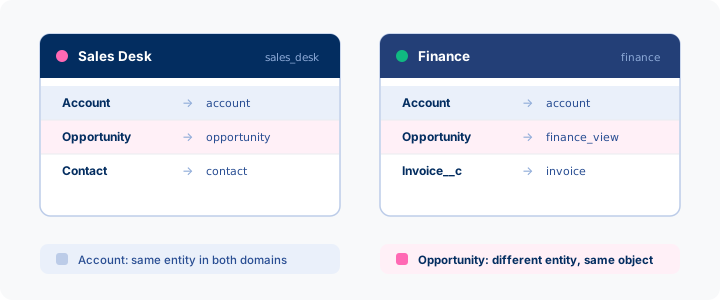
Both include Account; only Opportunity differs.
Serve two readings in one domain
Sometimes one audience needs both readings. Add both entities to the roster.
One entity is primary: an agent naming the object gets that one. The Primary for Object column shows which, and appears only where an object has more than one row. Click Make primary on the other row, then Save.
The other stays reachable: an agent names it alongside the domain.
Grant access
Each card carries two buttons.
| Button | Grants | Who it is for |
|---|---|---|
| Users | Read — this domain’s catalog | Anyone whose agents should see it |
| Managers | Edit — what it carries, and the entities it maintains | Individual people who look after the domain. They also need ContextWorks Domain Manager |
Both accept a user, a public group, a role, or a role and its subordinates. The card shows both counts.
Giving someone a domain limits them to it: the Default domain drops away, so there is nothing to revoke. Whether their agents can also change records is a separate question. → Domain access
Set a home domain
An entity’s home is the domain whose managers maintain it. It shows as a colored pill in the builder’s status bar and the Home Domain column; change it under the title’s cog. Home and membership are independent:
- An entity can be in five domains and homed in none. Homeless means admin-maintained.
- Rehoming changes who maintains an entity, never what any agent receives.
- Object defaults have no home. They answer every direct call, so they stay admin-owned.
Admins can rehome anything. A manager can only move an entity between two domains they manage.
Change what it carries
Add and remove on the domain’s own tabs, or click Edit on a card to move entities between Available and Included. The change is live on the next call — no deploy, nothing to regenerate in Agentforce.
Allow unattended writes
Where the domain allows writes, an Allow unattended writes box appears with it, for that domain’s managers or an admin to set. Off by default, an agent’s change comes back as a proposal and the record changes only after someone confirms.
Turn it on and the record changes on the first call, for automated processes with nobody in the loop. It never widens which fields agents can change. → Turning writes on
Notes
- Preview Catalog on a card shows what agents with this domain can discover right now — live coverage, not the membership list read back.
- Deploy → Custom generates Apex tools scoped to the domain; they call the package’s public API and name it. → Custom tools
- Deleting a domain leaves its entities alone: a domain references entities and never owns them. Tools that name it then report an unknown domain rather than falling back to another.
- Every agent call names one, so there is always at least General. Add another for a second view of an object, or a purpose-named tool a planner picks by intent.
What’s next
- Deploying — get this in front of agents