
Entities
An entity is a curated view of one Salesforce object: which fields an agent sees, in what order, and what they mean. It also carries related records, parent records, and computed values.
What an entity holds
| Part | What it is |
|---|---|
| Fields | A curated list per level, in render order |
| Instructions | Business meaning, for the whole record or per field |
| Related lists | Child records as rows, filtered and capped |
| References | A parent record embedded via a lookup |
| Library elements | The metrics, formulas, and enrichments it uses |
An entity is configuration only — it holds no data. Agents receive data assembled from its active version, not from the draft you edit. See Versions.
Label and API name
| Name | What it is |
|---|---|
| Label | What people read. Change it anytime |
| API name | The key tools, domains, and library elements reference. Generated from the label, editable from the builder’s title, must stay unique |
Changing the API name breaks anything pinned to the old one: Agentforce actions and MCP clients stop resolving, and observability history stays filed under the old name. Domains and library elements reference the entity record rather than its name, so they follow automatically.
One object, several entities
Two teams can see the same object differently:
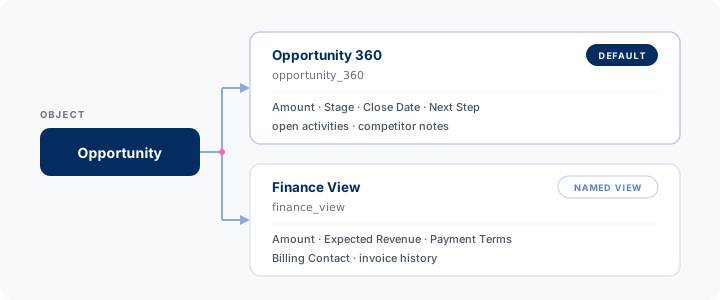
Each object has one default entity. ContextWorks answers with it when a caller names the object without naming an entity. The first entity you create for an object becomes the default.
Every entity you add after that is a named view, which a caller reaches by name or through a domain. Make Default on the row or card menu moves the flag, and the previous default becomes a named view. Only an admin can move it. You can’t delete a default while named views exist.
When an object has several entities, each one’s description tells them apart. You read it on the catalog card; an agent reads it in Get Catalog when choosing between them. Two entities with no descriptions leave the agent guessing from names alone.
Which entity answers a call
An agent always names a domain. It may narrow that domain with an entity, but it can’t skip it.
| The caller names | What answers |
|---|---|
| A domain and an object | The entity that domain carries for the object |
| A domain and an entity | That entity, read through that domain. The domain must serve it |
| A domain alone, several record IDs | Each record through that domain’s entity for its own object |
| An entity alone | Nothing — refused, naming the domains that do serve it |
| An object alone, or neither | Nothing — refused, naming the domains you hold |
A domain decides more than which entity answers: which briefs ride the payload, and whether writes may go unattended. So an entity narrows a domain rather than standing in for one.
Apex is different. ctxl.Entity.load(recordId) takes a record ID and nothing else, so code
calling the package directly still resolves through each object’s default entity. Only agent
calls have to name a domain. → Apex API
Add your own
Any queryable object can host an entity, including custom objects. Click Entities → +, pick the object, and name it. ContextWorks seeds the first entity for an object with a field list from its page layout. See Your first entity.
Notes
- Your records stay in Salesforce. ContextWorks indexes, caches, and syncs nothing, and builds each payload at call time.
- Curating hides a field; field-level security protects it. A field you leave out stays out of the payload.
- One entity is one shared definition. Payloads differ only because permissions differ. A different audience means a second entity, usually through a domain.