
What is ContextWorks
ContextWorks turns the data an agent needs — and the instructions for how to use it — into configuration. Curate views of your Salesforce data once and expose them everywhere agents run: Agentforce, MCP, Prompt Builder, Flow, Apex.
The problem
An agent asked about a Salesforce record needs to know which fields matter, what they mean, and what surrounds the record. A raw query answers none of that. It returns hundreds of fields, says nothing about which ones your org actually uses, and explains none of them.
The usual approaches each cost you something. Hard-coded prompts drift, and every change is a deploy. Broad query access can expose fields the user isn’t allowed to see, and leaves nobody sure which data the answer came from. Bespoke Apex gets rewritten for every new agent.
What an agent should see is a business decision, and it keeps ending up in code.
What ContextWorks does
You create curated views of your objects, called entities. An entity says which fields appear at which depth, what they mean, which related records travel with them, and which summary metrics (“open pipeline”) stand in for rows the agent would otherwise have to count. One call returns a readable payload, assembled live, filtered by the calling user’s permissions, with your guidance inline.
- Live. Payloads assemble at call time. No index, no sync job, no staleness.
- Permission-correct. Every query runs as the calling user — field-level security, object permissions, and record sharing apply. See Security.
- Curated. A person decided what belongs and what it means, once, for every agent.
- Governed. ContextWorks meters every load: tokens, latency, which fields the calling user could see, and which came back empty. See Observing.
Briefs, skills, and Info
An entity answers what is this record. Three other pieces answer the rest, and you add each to a domain the same way:
- Briefs — background an agent should read your data with: your sales methodology, your brand voice, a glossary, a policy line. → Briefs
- Skills — a procedure an agent follows: the steps in order, when to stop, and the shape the result has to take. → Skills
- Info — what your org already knows about the situation behind the question: your fiscal calendar, your currencies, who reports to whom. ContextWorks computes each one, so you never write them. → Info
A domain groups all of it into a named set an agent asks for by name. Whoever holds the domain receives what it carries. → Domains
One engine, every agent
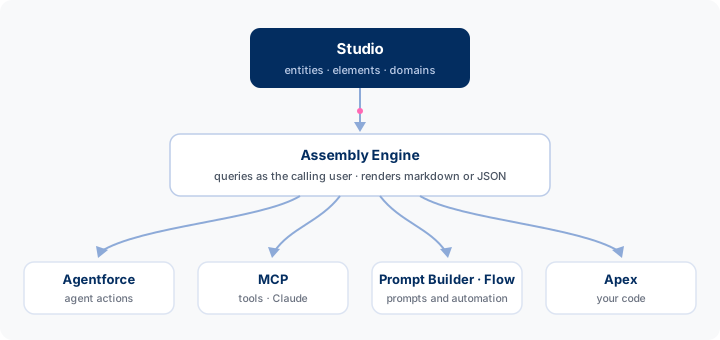
- One assembly engine. Agentforce and MCP make the same call; there’s no second implementation.
- The tools are thin. The packaged invocable actions are a few lines each over a public Apex API — write your own the same way (Custom tools).
- Two packages. The core package installs the engine, the ContextWorks app, and the invocable actions. Agentforce users add an optional extension package: one click registers the agent actions and two ready-made topics, ContextWorks for runtime and ContextWorks Administration for the admin agent. It’s separate because that metadata requires Einstein generative AI. → Deploying
Who does what
- Admins, RevOps, and business teams own which fields matter and what they mean — Building is point-and-click.
- Developers extend it: an Apex provider, a custom tool, or the Apex API.
- Agent builders register the actions — see Deploying.
What’s next
- Getting started — install and see it working.
- Concepts — the model behind it.